Every team I’ve worked with has the same problem: the data lives in a SQL database, but the people who need answers from it don’t write SQL. They end up pinging an engineer, waiting for a Slack reply, or just not asking the question at all.
Analytics-GPT is a small project I built to close that gap — a chat-style interface where you type a question in plain English and get back both the SQL query and the answer.
How it works
The flow is intentionally simple: a React front end takes the question, a Flask API passes it to a LangChain agent, and the agent does the two jobs that matter — writing the SQL and turning the result back into a sentence.
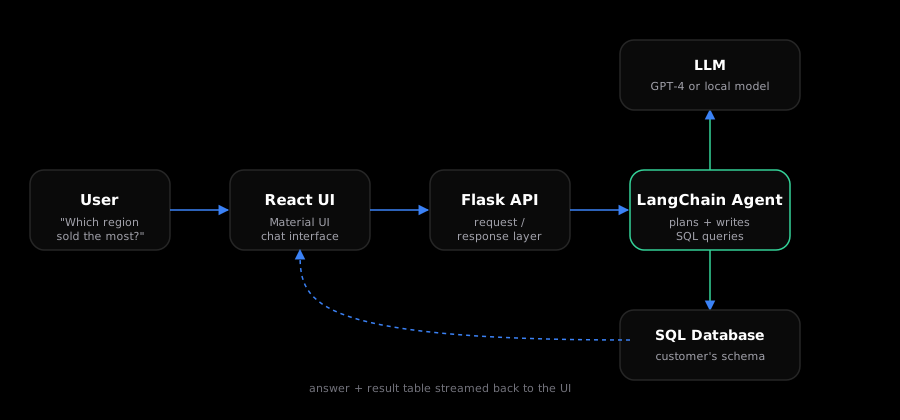
The agent is given the database schema up front, so it knows which tables and columns exist without needing a person to describe them. From there, it reasons about the question the same way a human analyst would: figure out what’s being asked, map it to tables, write the query, run it, and summarize.
A worked example
Here’s what happens end-to-end for a question like “Which products had the highest revenue last quarter?”
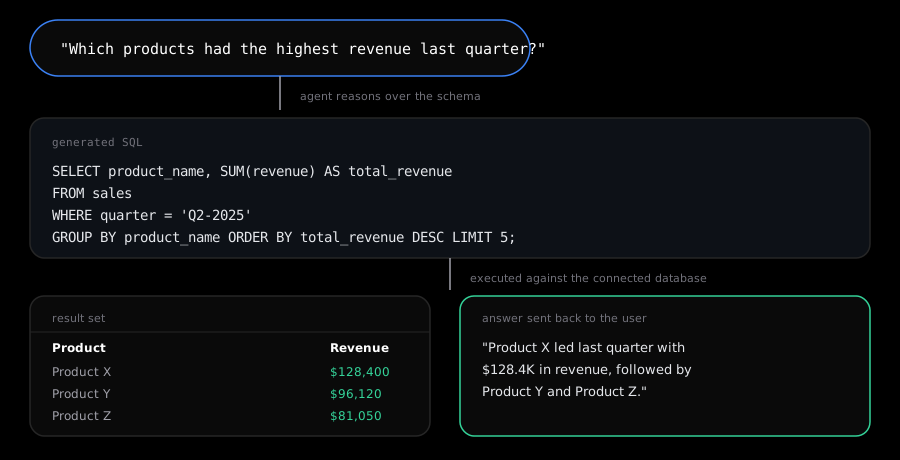
The important part isn’t the SQL itself — GPT-4 is generally good at that — it’s making sure the agent has just enough schema context to avoid hallucinating a column or table that doesn’t exist, and enough guardrails to avoid destructive queries. Analytics-GPT restricts execution to read-only queries and validates the generated SQL before it ever touches the database.
Local LLMs as a drop-in replacement
Not every team is comfortable sending their schema and data to a hosted API. One of the design goals for Analytics-GPT was to make the LLM backend swappable, so a local, self-hosted model could stand in for GPT-4 without changing anything else in the pipeline.
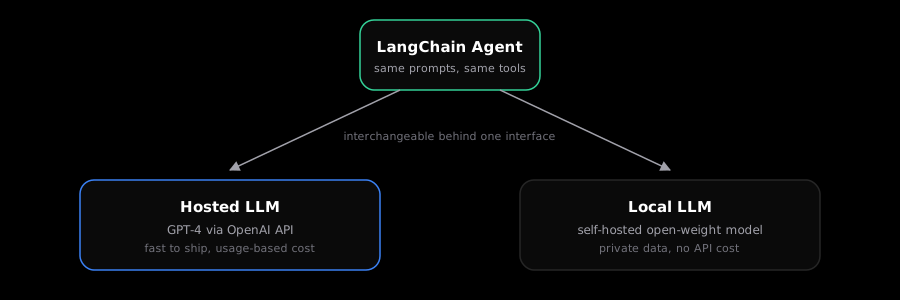
Because the agent, prompts, and tool definitions all sit behind the same LangChain interface, swapping the model is a configuration change, not a rewrite. That matters for teams with data residency constraints, or anyone who just wants to avoid per-query API costs once usage grows.
What I’d improve next
A few things I’d still like to tackle:
- Caching repeated questions — a lot of business questions get asked more than once with the same intent, just phrased differently.
- Chart generation — right now the output is a table and a sentence; a lot of questions would be better answered with a chart.
- Multi-table joins at scale — the agent does fine with a handful of tables, but reasoning gets shakier as schema size grows, which is where better retrieval over the schema (rather than dumping it all into the prompt) would help.
Analytics-GPT started as a college project, but the core idea — giving non-technical users a safe, honest way to query structured data — is one I keep coming back to in production work too.